Information Design - Project 1 & 2: Infographic Poster
JUMPLINKS
INSTRUCTIONS
LECTURES
Week 6 (No Lecture)
Week 7
Typography in Information Design

Why Do Your Infographic Fonts Matter?

The first and most crucial point to take into consideration when choosing infographic fonts is your brand.
Below is an infographic visualizing a series of fonts and their perceived personalities. Some fonts in this infographic are also on the list of recommended infographic fonts to try.

Using Legible Fonts
If a font isn’t legible, that font choice is a bust. How do you know if a font is legible or not? You have to test it.
There are a few factors that go into making a font readable. Some fonts are legible at every size, with any line spacing or even color. Others need a bit of customization to make them more legible.

Test Out Different Fonts

Find the Perfect Font Pair

Stick to the Same Fonts Throughout

Once you’ve settled on a font pairing after testing different options, stick to it!
Create a small reference graphic—like the examples above—to remind yourself which fonts you’re using.
This approach is especially helpful when working on an infographic with a team, ensuring everyone stays consistent.
Ensure Alignment and Visual Hierarchy

Conclusion
Experimentation and practice are key to mastering typeface selection. However, there are a few principles designers can follow to make choosing typefaces easier and more focused.
Week 8 (Independent Learning Week)
Week 9
Infographics Storyboard
Understanding the basics of storyboarding


7 Steps to Create an Effective Storyboard
Decide if you’re making a short film, a commercial, a feature-length film or something else entirely such as a novel or designing a website. Understand the story you want to tell and identify the main message or goals you intend to achieve through your project.
Step 2: Develop Your Script or Narrative
Create a clear script or storyline that outlines the sequence of events, dialogue, and key actions. A well-structured narrative provides a strong foundation for your storyboard, ensuring each scene effectively communicates your message.
Step 3: Storyboard structure and format
Choose a suitable storyboard format that aligns with your project’s needs. You can opt for traditional, digital, vertical, horizontal, or animatic formats depending on your project’s requirements. Determine the number of frames or panels you’ll need to represent each scene, shot, or sequence effectively.
Step 4: Sketch the frames
With your script or narrative as a reference, start sketching each
frame. Visualize and draw the scenes, characters, objects, and
backgrounds in each frame. Pay attention to composition, framing, and
camera angles to convey the mood and emotion of each scene accurately.
Specify how scenes transition from one to another, including cuts, fades or other visual effects to ensure a smooth flow of the narrative.
Conclusion
TASK
PART 1: Infographic Poster (20%)
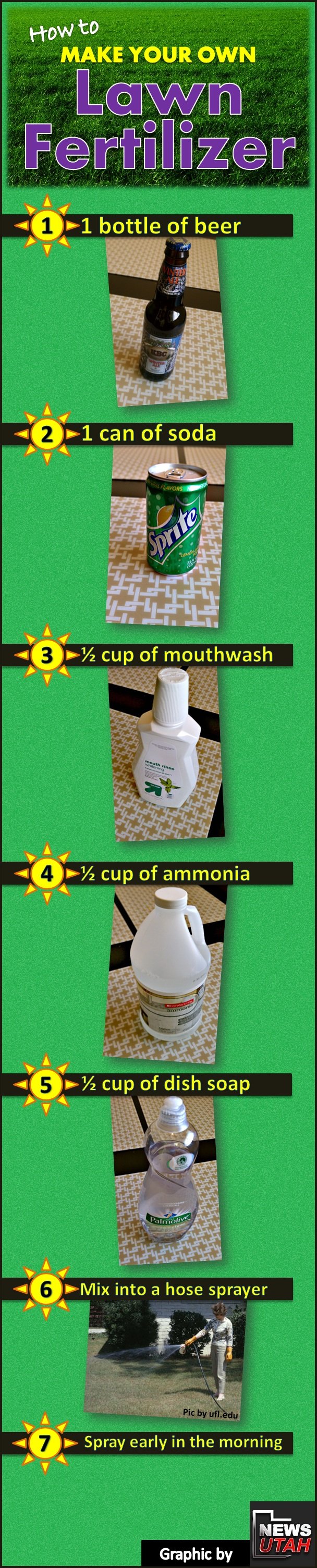
ORIGINAL INFOGRAPHIC POSTER
- There are too many competing colors (yellow, green, purple, bright cyan).
- Real photos create inconsistent lighting and perspective.
- Text is thin and sometimes hard to read against the green background.
- Some ingredients such as ammonia are not safe for public DIY lawn use, which decreases reliability.

REDESIGN SKETCH
- Minimal line-art icons
- Clear grouping of ingredients
- A more logical top-to-bottom reading flow
- Simplified titles and consistent text placement

This stage focuses on reorganizing content structure before focusing on color and style. The sketch helps solve problems from the original:
- Too many steps: condensed into clear three main application steps.
- Too many unnecessary ingredients: only the essential four remain.
- Consistency in icon style improves readability and reduces cognitive load.
FINAL POSTER
- Top section: Title + tagline
- Middle section: Ingredients
- Bottom section: Application guide
- Bold and all caps: creates a clear entry point and immediately tells the viewers what the poster is about.
- Centered at the top, with generous spacing: makes it feel stable and important.

PART 2: Minimal Animated Infographic (20%)
RESIZED POSTER
.png)
ANIMATING PROGRESS
To enhance the clarity and engagement of the poster, I incorporated simple motion effects using Canva.
For the ingredient border, I applied the “Pop” animation to each component. They appear one by one in sequence, which helps viewers understand the correct order of the ingredients more intuitively. This sequential popping effect makes the flow clearer and adds a sense of progression to the layout.
.png)
.png)
.png)
.png)


Comments
Post a Comment